MXQuery now also runs on Android, providing the full functionality and platform integration.
More details are available here
> A lightweight, full-featured XQuery Engine
With version 2.2, XQDT has restored support for Java-based XQuery implementation, which was dropped in the transition from XQDT 1 to XQDT 2.0. Here is an outline on how to use MXQuery 0.6.0 (or later) in XQDT 2.2
Please do the following:
Install XQDT as outlined on the XQDT web site.
XQDT 2.2 does not bundle any implementation, so please download and unpack MXQuery normally.
In Eclipse, go to the Window menu, choose Preferences.
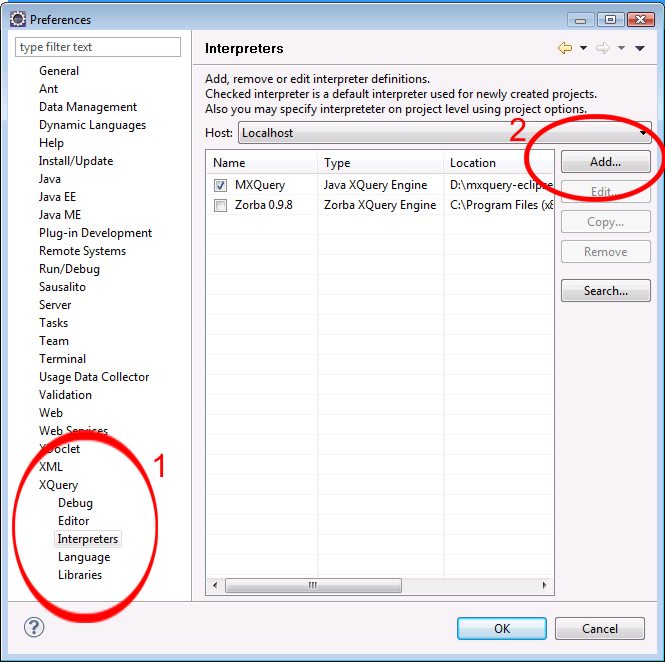
In the preferences dialog, choose XQuery, and then Interpreters.
In the list of interpreters, choose Add…
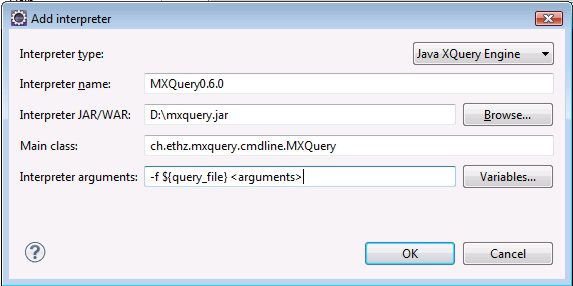
In the dialog to add an interpreters, choose the following
Interpreter Type: Java XQuery Engine
Interpreter Name: MXQuery0.6.0 (or any other name)
Interpreter JAR/WAR: yourMXQueryPath\mxquery.jar (e.g. D:\mxquery.jar)
Main class: ch.ethz.mxquery.cmdline.MXQuery
Interpreter arguments: -f ${query_file} <arguments>
If necessary, add more command line flags to the enable additional features, e.g. -um for updates, -x11 for XQuery 1.1 etc
You can now choose MXQuery as an interpreter for your XQuery projects